A weekly meal planner that ends with a grocery list
Meal planning fails when it is a separate spreadsheet. In EasyPlate the plan is made of your own recipes: drag one onto Tuesday dinner and the ingredients are already on the grocery list, the nutrition is already in the weekly dashboard, and Cook Mode is one tap away when Tuesday comes.
The plan is shared with whoever cooks with you. Change Thursday and your partner sees it immediately. Plans can be saved and reused, so a good week becomes a template rather than a memory.
3 min read
Free to start. No credit card needed.
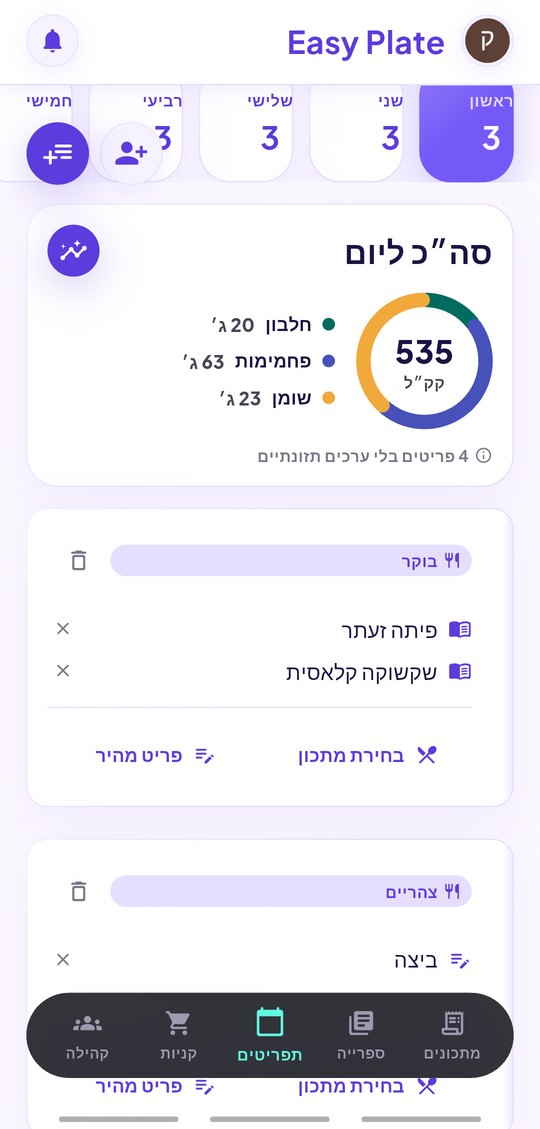
Plan with recipes you actually have
Every recipe in your books can go on the plan, including the ones you just saved from TikTok or a blog:
- Breakfast, lunch, dinner and snacks for each day of the week.
- Drag a recipe onto a day; scale servings for the number of people eating.
- Ask the built-in assistant for ideas: "plan four cheap vegetarian dinners from my books".
- Reuse a plan next week or share it as a ready-made menu.
The grocery list and the macros come free
A plan is the source of the grocery list and of the nutrition dashboard. You never copy ingredients, and you never add up calories by hand.
- One grocery list for the whole week, merged and grouped by aisle.
- Calories, protein, carbs and fat per serving on each planned meal.
- A weekly dashboard that sums the plan, so you see the week before you eat it.
- Estimated cost of the week from your own receipt history.
Shared with the household
Share a plan with another account as a viewer or an editor. Every edit reaches the other phone in real time, and the shared plan keeps working as recipes are added to it. It is the simplest way to stop the nightly "what are we eating" conversation.
- Real-time sync between family members.
- Viewer or editor access per person.
- Offline-first: the plan opens in the kitchen without a signal.
- Five languages; switching translates your plans and recipes too.
How it works
-
01
Collect recipes
Save recipes from links, text, voice or PDF, or write your own. Each one gets nutrition per serving automatically.
-
02
Fill the week
Drag recipes onto the days of the week. The grocery list and the weekly nutrition total build themselves.
-
03
Shop once, cook daily
Walk the store with the aisle-grouped list, then open Cook Mode each evening for hands-free steps and timers.
Frequently asked questions
Does the meal planner create the grocery list automatically?
Yes. Every recipe on the plan adds its ingredients; duplicates are merged and the list is grouped by supermarket aisle.
Can I see calories for the whole week?
Yes. Each recipe has estimated calories, protein, carbs and fat per serving, and the dashboard sums the planned meals across the week.
Can I plan for a different number of people?
Yes. Scale the servings of any planned recipe and both the amounts and the grocery list follow.
Can my partner edit the plan?
Yes. Share the plan as an editor and changes sync in real time on both phones.
Is the meal planner free?
Yes. The weekly plan, grocery list and nutrition dashboard are included in the free account. Pro removes the daily AI limit and the ads.
More guides

Plan the week once. Cook all week.
Download EasyPlate and build your first plan from recipes you already love.